
Your Shopping Cart
Support: ping20Si
Here you’ll find everything you’ll need to install, maintain, and learn about your ping20Si. In addition to that you can fill out a support ticket for advanced problems and get into the details of Certification and Documentation.
FAQs
Frequently Asked Questions
-
-
What is the ping20Si, and what is it designed for?
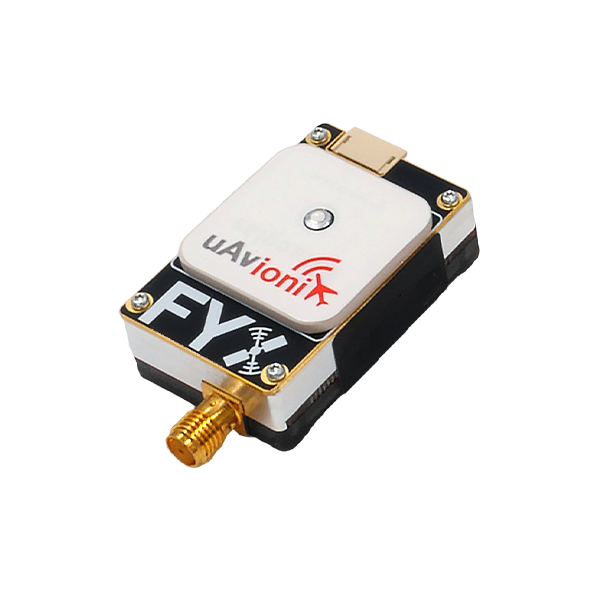
A complete Mode S ADS-B transponder system with integrated SBAS GPS and barometric sensor, designed to meet conspicuity requirements for Unmanned Aircraft Systems (UAS) in controlled airspace.
-
What regulatory standards does the ping20Si meet?
Meets DO-181E Class 1, Level 2els (20W), DO-260B Class B1S, DO-229D Class Beta 1, ICAO Annex 10 Vol IV, and EuroCAE ED-115 Class LcF. Also complies with Radio Equipment Directive 2014/53/EU.
-
What is the ping20Si, and what is it designed for?
-
-
How do I mount the ping20Si?
Use the provided double-sided mounting tape on the ping logo side and secure to a flat surface. Confirm cable lengths reach power before mounting.
-
Where should I place the ping20Si for optimal GPS performance?
The integrated GPS antenna requires a clear view of the sky. Avoid placement under props, near shadowing features, or under signal-blocking materials like carbon fiber.
-
How do I install the external 1090 MHz antenna?
Connect via the SMA connector hand tight (5-7 in/lbs). Mount vertically in a location least obstructed by the aircraft during flight.
-
What are the dimensions and weight of the ping20Si?
50 × 25 × 17 mm, 20 grams.
-
How do I mount the ping20Si?
-
-
What voltage does the ping20Si require?
11–28V DC (1W avg in ON/ALT, 0.5W in Standby). Use 11–16V DC during programming.
-
What power connector is used?
Molex 0436450200
Pin 1: Power (11–28V)
Pin 2: Ground
-
Can I power it with a 3S battery?
Yes—connect the power harness to a 3S battery or appropriate aircraft power source.
-
What voltage does the ping20Si require?
-
-
How do I program the ping20Si?
1. Install uAvionix Ping App found under the “Utilities” header here.
2. Connect ping Programmer using JST ZHR-5 to 4-pin cable (5-pin to transponder, 4-pin to programmer).
3. Apply 11–16V DC.
4. Join Wi-Fi network Ping-XXXX (password: uavionix).
5. Launch app → Configuration → fill fields → Update.
-
What is the Wi-Fi network and password?
SSID: Ping-XXXX (XXXX = random, e.g., Ping-5379) Password: uavionix “No Internet Connection” is normal.
-
Why won't the ping20Si transmit during setup?
It will not transmit while the ping Programmer is connected. Disconnect programmer and power after configuration.
-
What are the default power-up modes?
Standby: No response to interrogation
ON: Replies with 4-digit squawk
ALT: Replies with altitude ADS-B 1090ES transmits only in ON/ALT with valid 6-digit ICAO.
-
How do I enter the ICAO address?
Enter your 6-digit ICAO in hexadecimal. Convert from octal if needed. Do not enter 000000.
-
What should I enter for Call Sign, Emitter, and VFR Code?
Call Sign: Tail number (A–Z, 0–9)
Emitter: Select UAV for unmanned
VFR Code: 1200 (U.S.), or your country’s default
-
What are GPS Offsets?
Distance (in meters) from GPS antenna to:
Roll axis (lateral)
Nose (longitudinal)
-
Do I need a GPS fix to configure?
No—but required to monitor latitude, longitude, and GPS altitude in the app. It is also required to transmit.
-
How do I verify configuration?
After “Device Configured”, tap Monitor and verify all fields. Tap OK, then disconnect power and programmer.
-
How do I program the ping20Si?
-
-
What serial interfaces are available?
Control (JST ZHR-4, 57600 bps): GDL90/MAVLink (RXD, TXD, 5V, GND)
Programming (JST ZHR-5, 115200 bps): GDL90
Compatible with PixHawk TELEM and popular autopilots
-
Does the ping20Si receive ADS-B (ADS-B In)?
No built-in receiver. Set ADS-B In Capability to None unless using a separate receiver.
-
What is COM1 Rate for?
Sets serial port baud rate for external control of the transponder.
-
What serial interfaces are available?
-
-
What do the LED indicators mean?
LED COLOR SOLID FLASHING
GREEN POWERED RECEIVING INTERROGATION
RED FAULT TRANSMITTING
-
What is the transmit power and frequency?
20W nominal at 1090 MHz (ADS-B DF17) and 1030 MHz (Mode S)
-
What is the operating temperature range?
-45°C to +80°C
-
How accurate is the altimeter?
Temperature-controlled barometric sensor, range -1,000 to 50,000 ft
-
What do the LED indicators mean?
-
-
Is the ping20Si FCC approved for sale in the US?
Not yet authorized for general sale/lease in the US (except direct to U.S. Government or export).
-
What is the ECCN?
The ECCN is 7A994
-
Is the ping20Si FCC approved for sale in the US?
-
-
What optional accessories are available?
Wi-Fi Programmer Adapter
1030/1090 MHz Transponder Antenna
-
Can I reconfigure the ping20Si later?
Yes—reconnect programmer, join Wi-Fi, edit in app, and update. Always disconnect programmer before flight.
-
What optional accessories are available?