
Your Shopping Cart
Support: ping2020i
Here you’ll find everything you’ll need to install, maintain, and learn about your ping2020i. In addition to that you can fill out a support ticket for advanced problems and get into the details of Certification and Documentation.
FAQs
Frequently Asked Questions
-
-
What is the ping2020i and what does it do?
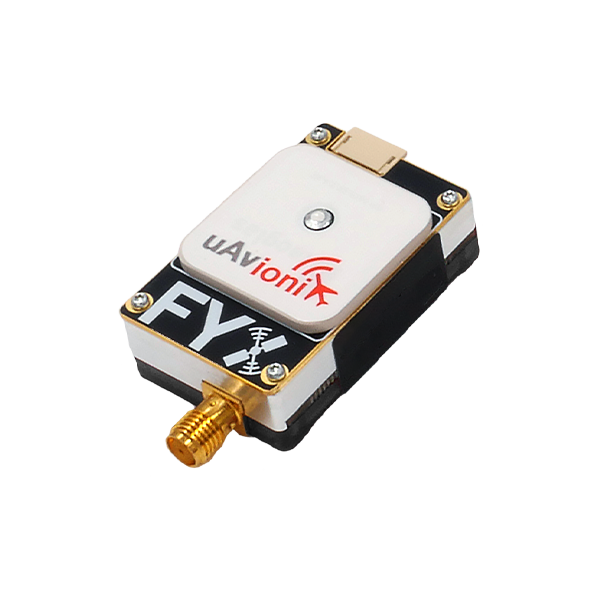
The ping2020i is a 26-gram, dual-link ADS-B transceiver for UAS. It receives ADS-B traffic on 1090 MHz and 978 MHz within ~100 statute miles and transmits ADS-B Out on 978 MHz (UAT). It includes an integrated SBAS GPS, precision altimeter, and outputs GDL 90/Mavlink data for autopilots.
-
Is the ping2020i TSO-certified?
No, the ping2020i is not TSO certified.
-
What is the detection range?
~100 statute miles line-of-sight for ADS-B equipped aircraft (depends on altitude, terrain, and transmitter power).
-
What is the ECCN for the ping2020i?
The ECCN for the ping2020i is 7A994
-
What is the ping2020i and what does it do?
-
-
What are the power requirements?
Input voltage: 11–28 V DC. Average power: 500 mW; peak: 30 W (400 µs pulse). Use the included Molex power harness.
-
What baud rates are used?
COM1 (Control/Ownship): 57,600 bps GDL 90/Mavlink.
COM2 (Programming): 115,200 bps GDL 90.
-
What is the operating temperature range?
–45 °C to +70 °C.
-
What are the power requirements?
-
-
What antennas are included and can I use my own?
A 978 MHz monopole antenna is included. Any antennas certified to TSO-C66, C74, or C112 with ≤4 dBi gain, omni pattern, and VSWR ≤1.8:1 at 978 MHz are approved. Never modify the device or use non-approved antennas.
-
How close can the antenna be to people?
Keep antenna ≥4 cm from any person. Disconnect power to stop RF emissions.
-
What antennas are included and can I use my own?
-
-
Where should I mount the ping2020i and the antenna?
Device: Logo side down on double-sided tape; ensure GPS antenna (top) has unobstructed sky view. Avoid carbon fiber, props, or structures that block GPS.
Antenna: Vertical orientation on foam tape, least obstructed location in normal flight.
-
Why can't I get a GPS fix?
Ensure clear sky view (no carbon fiber, props, or shadowing).
Battery-backed GPS needs first fix outdoors; subsequent TTFF is fast.
Monitor page shows lat/long/altitude only with fix.
-
Where should I mount the ping2020i and the antenna?
-
-
How do I configure the ping2020i?
1. Install “uAvionix Ping Installer” app (iOS/Android) found under the “Utilities” header here.
2. Connect ping Programmer (5-pin to device, 4-pin to programmer).
3. Power device (11–28 V).
4. Join Wi-Fi “Ping-XXXX” (password: uAvionix).
5. Set ICAO (hex), Call Sign, Emitter (UAV), Vso, aircraft dimensions, GPS offsets, and Control mode.
6. Tap Update → Monitor to verify. Remove programmer before flight (device won’t transmit with it attached).
-
Can I disable transmit (receive-only mode)?
Yes. In the app, set Control → Receive (transmit disabled)
-
Why does the app say “No Internet Connection”? Normal.
The ping2020i creates a local Wi-Fi hotspot for configuration only.
-
How do I configure the ping2020i?
-
-
What do the LEDs mean?
GREEN flashing: Receiving UAT/1090ES traffic.
RED solid: Fault.
RED flashing: Transmitting.
-
My device shows a red FAULT LED – what now?
Check power (11–28 V), connections, and antenna. Re-run configuration. Contact uAvionix support if persistent.
-
What do the LEDs mean?
-
-
How do I connect to a Pixhawk autopilot?
1. Use the 4-pin JST to 6-pin DF13 cable: 4-pin → ping2020i Data port, DF13 → Pixhawk TELEM2.
2. In Mission Planner, set ADSB_ENABLE = 1. Traffic appears on the map when green LED flashes. -
Will the ping2020i work with ArduPilot, PX4, or other autopilots?
Yes, via GDL 90/Mavlink on COM1. Pixhawk setup shown; others require compatible serial input and parameter enablement.
-
How do I connect to a Pixhawk autopilot?