
Support: ping20Si
Here you’ll find everything you’ll need to install, maintain, and learn about your ping20Si. In addition to that you can fill out a support ticket for advanced problems and get into the details of Certification and Documentation.
FAQs
Frequently Asked Questions
What is the ping20Si, and what is it designed for?
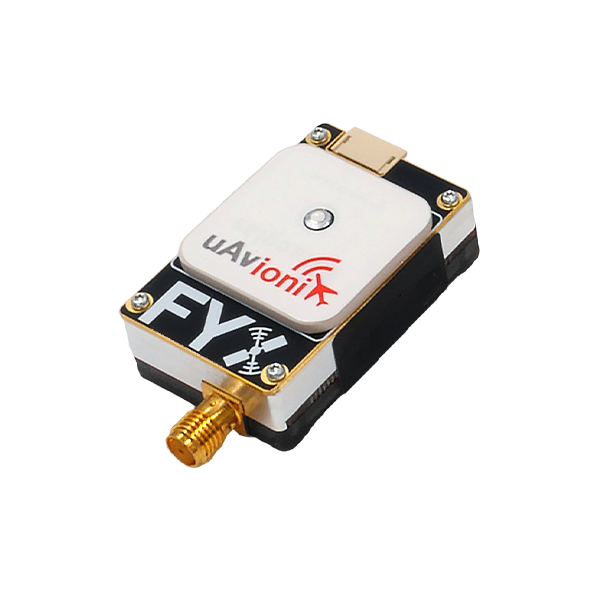
A complete Mode S ADS-B transponder system with integrated SBAS GPS and barometric sensor, designed to meet conspicuity requirements for Unmanned Aircraft Systems (UAS) in controlled airspace.
What regulatory standards does the ping20Si meet?
Meets DO-181E Class 1, Level 2els (20W), DO-260B Class B1S, DO-229D Class Beta 1, ICAO Annex 10 Vol IV, and EuroCAE ED-115 Class LcF. Also complies with Radio Equipment Directive 2014/53/EU.
How do I mount the ping20Si?
Use the provided double-sided mounting tape on the ping logo side and secure to a flat surface. Confirm cable lengths reach power before mounting.
Where should I place the ping20Si for optimal GPS performance?
The integrated GPS antenna requires a clear view of the sky. Avoid placement under props, near shadowing features, or under signal-blocking materials like carbon fiber.
How do I install the external 1090 MHz antenna?
Connect via the SMA connector hand tight (5-7 in/lbs). Mount vertically in a location least obstructed by the aircraft during flight.
What are the dimensions and weight of the ping20Si?
50 × 25 × 17 mm, 20 grams.
What voltage does the ping20Si require?
11–28V DC (1W avg in ON/ALT, 0.5W in Standby). Use 11–16V DC during programming.
What power connector is used?
Molex 0436450200
Pin 1: Power (11–28V)
Pin 2: Ground
Can I power it with a 3S battery?
Yes—connect the power harness to a 3S battery or appropriate aircraft power source.
How do I program the ping20Si?
1. Install uAvionix Ping App found under the “Utilities” header here.
2. Connect ping Programmer using JST ZHR-5 to 4-pin cable (5-pin to transponder, 4-pin to programmer).
3. Apply 11–16V DC.
4. Join Wi-Fi network Ping-XXXX (password: uavionix).
5. Launch app → Configuration → fill fields → Update.
What is the Wi-Fi network and password?
SSID: Ping-XXXX (XXXX = random, e.g., Ping-5379) Password: uavionix “No Internet Connection” is normal.
Why won't the ping20Si transmit during setup?
It will not transmit while the ping Programmer is connected. Disconnect programmer and power after configuration.
What are the default power-up modes?
Standby: No response to interrogation
ON: Replies with 4-digit squawk
ALT: Replies with altitude ADS-B 1090ES transmits only in ON/ALT with valid 6-digit ICAO.
How do I enter the ICAO address?
Enter your 6-digit ICAO in hexadecimal. Convert from octal if needed. Do not enter 000000.
What should I enter for Call Sign, Emitter, and VFR Code?
Call Sign: Tail number (A–Z, 0–9)
Emitter: Select UAV for unmanned
VFR Code: 1200 (U.S.), or your country’s default
What are GPS Offsets?
Distance (in meters) from GPS antenna to:
Roll axis (lateral)
Nose (longitudinal)
Do I need a GPS fix to configure?
No—but required to monitor latitude, longitude, and GPS altitude in the app. It is also required to transmit.
How do I verify configuration?
After “Device Configured”, tap Monitor and verify all fields. Tap OK, then disconnect power and programmer.
What serial interfaces are available?
Control (JST ZHR-4, 57600 bps): GDL90/MAVLink (RXD, TXD, 5V, GND)
Programming (JST ZHR-5, 115200 bps): GDL90
Compatible with PixHawk TELEM and popular autopilots
Does the ping20Si receive ADS-B (ADS-B In)?
No built-in receiver. Set ADS-B In Capability to None unless using a separate receiver.
What is COM1 Rate for?
Sets serial port baud rate for external control of the transponder.
What do the LED indicators mean?
LED COLOR SOLID FLASHING
GREEN POWERED RECEIVING INTERROGATION
RED FAULT TRANSMITTING
What is the transmit power and frequency?
20W nominal at 1090 MHz (ADS-B DF17) and 1030 MHz (Mode S)
What is the operating temperature range?
-45°C to +80°C
How accurate is the altimeter?
Temperature-controlled barometric sensor, range -1,000 to 50,000 ft
Is the ping20Si FCC approved for sale in the US?
Not yet authorized for general sale/lease in the US (except direct to U.S. Government or export).
What is the ECCN?
The ECCN is 7A994
What optional accessories are available?
Wi-Fi Programmer Adapter
1030/1090 MHz Transponder Antenna
Can I reconfigure the ping20Si later?
Yes—reconnect programmer, join Wi-Fi, edit in app, and update. Always disconnect programmer before flight.